Short answer: AppX is a good fit if your products have long, detailed specs and entering them takes too much time. Think electronics, tools, furniture, lighting, auto parts or outdoor gear. You can paste specs from a spreadsheet, fill values from Shopify fields and metafields, and use one template across many products. It is not the right fit if you need values that change with the selected variant, side-by-side product comparisons, or support for a vintage (non-Online Store 2.0) theme.
We make AppX, so read this with that in mind. We’ve tried to be as clear about what it can’t do as what it can.
What AppX is
AppX - Product Specs Table is a Shopify app that adds clean, easy-to-read specification tables to your product pages.
You build a template once (for example “Laptop Specs”), add rows, and assign it to your products. Then you add the AppX block to your product page in the theme editor. No code.
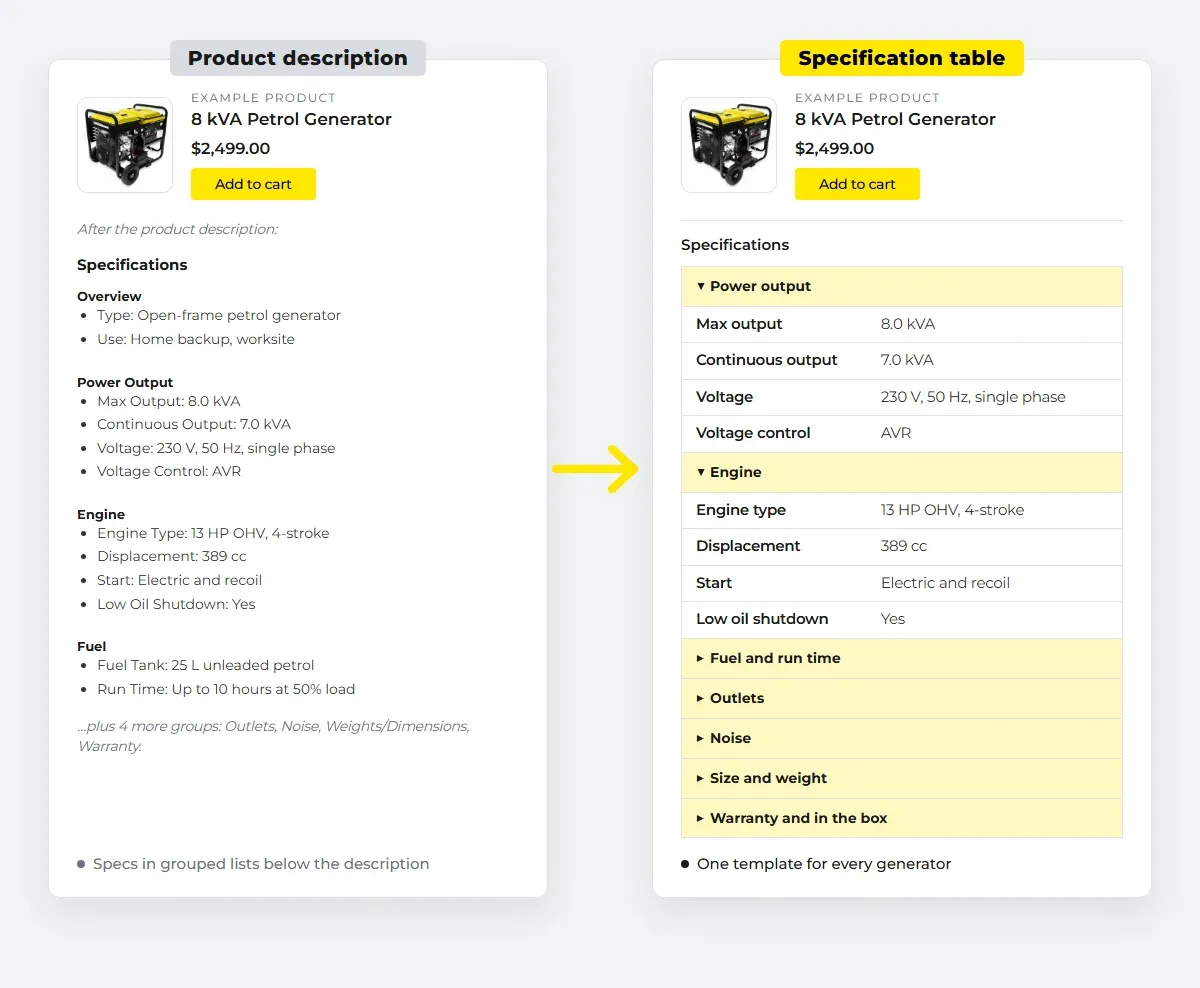
A quick fit check
| Your situation | Is AppX a fit? |
|---|---|
| Your specs are bullet lists or pasted blocks in the product description | ✅ Yes, this is what it’s built for |
| Your specs are already in a spreadsheet or on a supplier’s website | ✅ Yes, paste the table in one go (up to 200 rows) |
| Your specs are already stored in metafields | ✅ Yes, pick the metafield from a dropdown, no Liquid |
| Many products share the same set of specs | ✅ Yes, one template can cover many products |
| Most of your shoppers browse on mobile | ✅ Yes, rows stack label-over-value on phones |
| You use a free or paid Online Store 2.0 theme | ✅ Yes |
| You use a vintage theme | ❌ No, vintage themes aren’t supported |
| Specs must change when the shopper picks a different variant | ❌ No, values don’t follow the selected variant |
| You want shoppers to compare two or more products side by side | ❌ No, AppX shows one product’s specs |
| You want to assign tables by collection, tag or product type | ❌ Not yet. You assign to all products (with exclusions) or to selected products |
| You need CSV import/export, translations or right-to-left text | ❌ Not yet |
Who AppX is for
Stores with long, detailed spec sheets. Some products have five specs. Others have fifty. AppX handles both. A table can hold up to 200 rows. You group them under section headers like “Display”, “Battery” or “Dimensions”. On long tables, collapsible sections let shoppers open only the part they need, so the page stays tidy.
Stores where data entry is the real problem. Typing specs into every product takes hours. AppX cuts most of that work:
- Paste instead of type. Copy a spec table from Excel, Google Sheets or a supplier’s website. Paste it into AppX, and the rows are created in one go.
- Let Shopify fill the values. A row can take its value from a product field, such as vendor, SKU, barcode, weight or price. You don’t type it again.
- Use the metafields you already have. Pick a metafield from a dropdown, and each product shows its own value. No Liquid or JSON.
Stores with many similar products. Build a template once, then assign it to all your products or just the ones you choose. Rows filled from Shopify fields and metafields show each product’s own values. Change the template, and every product that uses it updates.
Merchants who want an editor that’s easy to use. The AppX editor feels like working with a table. Content, styling and product assignment are all in one place, in one editor. You can preview the table on desktop, tablet and mobile, and undo or redo any change.
Merchants who don’t want to touch theme code. AppX uses a Shopify app block. You place it in the theme editor like any other section. You don’t edit Liquid files.
Small catalogs and growing ones. The free plan covers 25 products and is a permanent plan, not a trial. Paid plans go up to unlimited products.
Who AppX isn’t for (yet)
We’d rather you know this before you install.
- Variant-specific specs. If a 13-inch and a 15-inch laptop are variants of one product, the table won’t switch values when the shopper changes the variant. If that matters, look for an app that says it’s variant-aware, or set those products up as separate products.
- Comparison tables. AppX shows the specs of the product on the page. It doesn’t build “compare these 3 models” tables.
- Vintage themes. AppX needs an Online Store 2.0 theme, because it uses app blocks.
- Bulk assignment by collection or tag. Today you choose “All products” (and exclude some) or pick products one by one or many at once.
- Word or PDF spec sheets. Pasting works from Excel, Google Sheets and HTML tables on web pages, not from Word documents or PDFs. For Word or PDF, you need to enter the values cell by cell.
- Structured data. AppX outputs a normal HTML table that search engines can read, but it doesn’t add JSON-LD or schema markup.
If one of these is a deal-breaker, AppX probably isn’t the right app for you today. You can tell us at support@hiappx.com. Requests like these decide what we build next.
What you get on the storefront
- Two columns on desktop, stacked on mobile. You can also keep the desktop layout on phones.
- 5 style presets: Modern, Classic, Minimal, Multi-column and Accordion, each in 6 accent colours. Or adjust colours, fonts, dividers and spacing yourself. To see them live, visit the demo store from our Shopify App Store listing page.
- Collapsible sections for long tables, so shoppers open only what they need.
- Empty rows hide themselves. If a product has no value for a row, that row doesn’t show.
- It matches your theme by default.
- No JavaScript added to your storefront. The block is plain HTML and one CSS file.
- Search engines can read your specs. Shopify renders the full table in the page HTML, including the text inside collapsed sections.
- An accessible table, with proper row headers and keyboard support.
Pricing
| Plan | Monthly | Annual | Products with a spec table | Free trial |
|---|---|---|---|---|
| Free | $0 | — | 25 | — |
| Go | $4.99 | — | 250 | 60 days |
| Plus | $9.99 | $99.99/yr | 1,000 | 60 days |
| Max | $14.99 | $145.99/yr | Unlimited | 60 days |
Billing goes through Shopify. No hidden charges. Development stores are free with no time limit.
How long does setup take?
About 10 minutes for your first table:
- Install AppX.
- Create a template and add rows (or paste them from a spreadsheet).
- Group rows under section headers like “Display” or “Battery”.
- Assign the template to your products.
- Add the AppX block to your product page in the theme editor.
The getting started guide walks through each step.
An honest note on where AppX is today
AppX launched on the Shopify App Store in October 2026. It’s new. If you try it, we’d value your honest feedback, good or bad.
Try it
You can install AppX from the Shopify App Store and start on the free plan. If you get stuck, email support@hiappx.com or use the live chat in the app. We reply within 1 business day.
FAQ
Is AppX free? Yes, there’s a permanent free plan for up to 25 products. Paid plans start at $4.99 a month and include a 60-day free trial.
Do I need to know how to code? No. You build tables in the app and place the block in the theme editor. You don’t edit theme code, Liquid or JSON.
Does AppX work with my theme? It works with Online Store 2.0 themes. It doesn’t support vintage themes. By default the table picks up your theme’s styling.
Can the table change when a shopper picks a different variant? No. Values don’t follow the selected variant today.
Can I show metafields with AppX? Yes. Choose the metafield’s namespace and key from a dropdown, and the value fills the row. See Shopify fields and metafields.
Will a spec table slow down my store? We don’t add jQuery or any other JavaScript library to your store. The table is only HTML and CSS.