Short answer: A spec table lists the facts shoppers need before they buy. For most products, that means:
- Size and weight
- Materials
- What it works with
- Power or battery
- What’s in the box
- Warranty
Keep it easy to scan. Use the same labels and units on every product of the same type. Group related rows under short headings. Put the most important specs first. Skip anything the photos or title already show.
Below is a simple checklist, then ready-to-copy spec lists for six product types.
We make AppX, a Shopify app for spec tables. This guide works whatever tool you use, including a plain table in your product description.
Why a spec table at all?
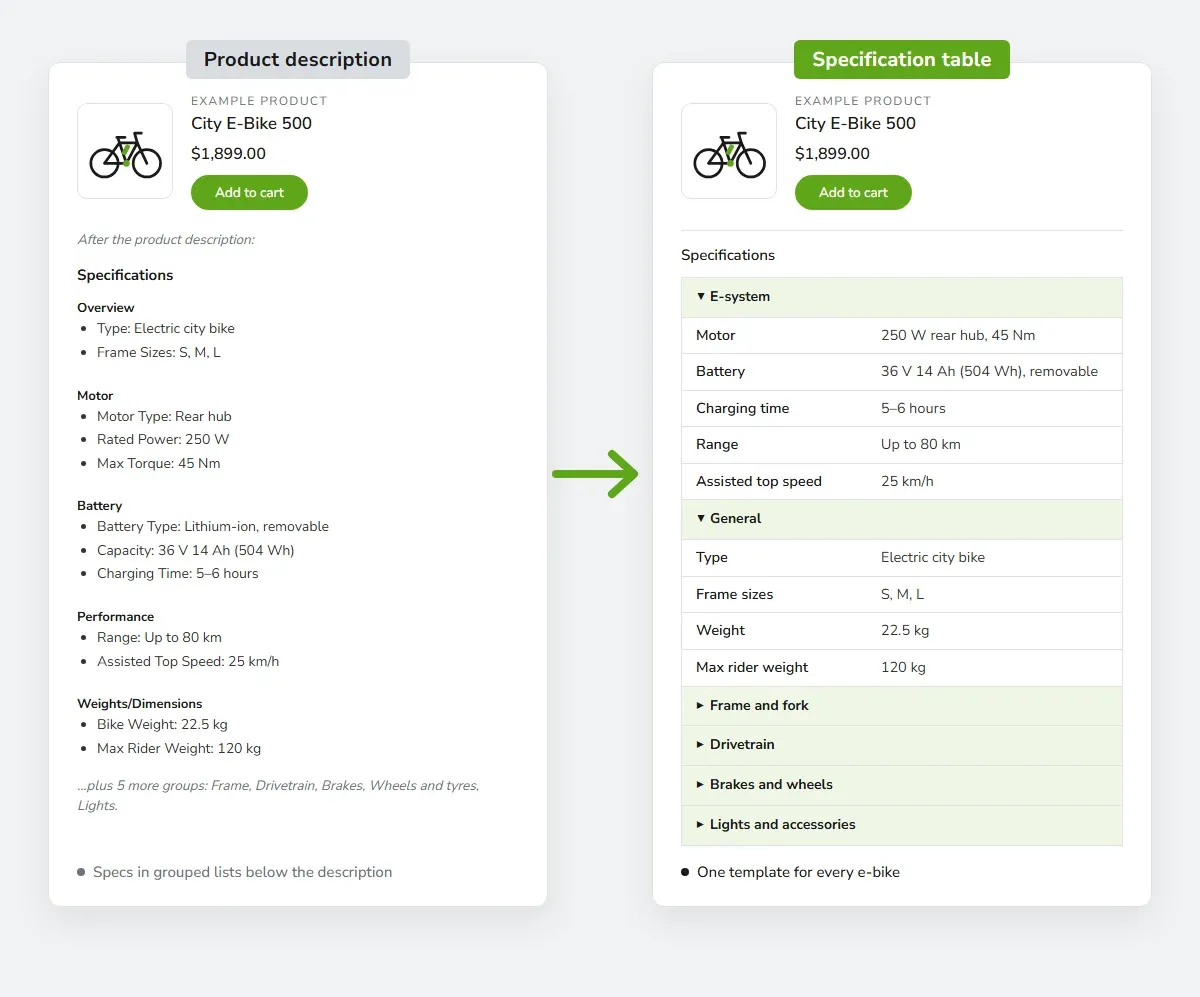
Example: the same e-bike specs as lists in the description (left) and as one spec table (right).
Most shoppers don’t read a product page from top to bottom. They scan it for one or two facts they care about. “Will it fit?” “Does it work with my phone?” “How heavy is it?”
For many products, those facts make a long list. When they’re buried in a paragraph, the shopper has to hunt for them. So they ask you in live chat or by email. Or they leave.
A table puts each fact on its own row with a clear label. Shoppers find their answer in seconds. It’s easier to compare two of your products. And it’s easier for you to keep correct when details change.
The 6 rules for a good spec table
- Answer “will it fit / work for me?” first. Put the specs people use to rule a product in or out at the top: size, compatibility, capacity, power.
- Use the same labels on every product of a type. “Weight” on every laptop, not “Weight” on one and “Item weight” on another. Shoppers compare by label.
- Always include units. “1.4 kg”, “60 W”, “120 × 60 cm”. A number without a unit is a question waiting to happen. If you sell in more than one market, consider both metric and imperial (“1.4 kg (3.1 lb)”).
- Group rows under short headings. Five to eight rows per group is easy to scan. Common groups: Dimensions, Materials, Power, Connectivity, In the box, Warranty.
- One fact per row. “Battery: 5,000 mAh, 18 W fast charging” is two facts. Split it into “Battery capacity” and “Charging power”.
- Leave out the obvious and the empty. Don’t list “Colour: Black” if the product only comes in black and the photos show it. And don’t show rows with no value (“Bluetooth: –” on a product that has none). Remove them, or say “No” if shoppers really ask.
What to leave in the description instead
A spec table holds facts. Keep these in your description or elsewhere on the page:
- Why the product is good, who it’s for, how it feels to use.
- Care and how-to instructions longer than a line.
- Shipping and returns (better in a shared section or policy page).
- Marketing claims you can’t measure (“premium quality”).
Spec lists by product type
Copy these as a starting point. Rename labels to match how your customers talk, and delete rows that don’t apply to what you sell.
Electronics (laptops, tablets, phones)
| Group | Rows |
|---|---|
| Display | Screen size, Resolution, Panel type, Refresh rate |
| Performance | Processor, Memory (RAM), Storage |
| Battery | Battery capacity, Charging power, Charger included (Yes/No) |
| Connectivity | Ports, Wi-Fi, Bluetooth, SIM / eSIM |
| Physical | Dimensions, Weight, Colour |
| In the box | Contents list |
| Support | Warranty, Operating system |
Furniture
| Group | Rows |
|---|---|
| Dimensions | Overall width × depth × height, Seat height, Seat depth, Weight |
| Materials | Frame, Upholstery / surface, Finish |
| Use | Maximum load, Indoor / outdoor, Number of seats |
| Assembly | Assembly required (Yes/No), Tools included, Estimated assembly time |
| Care | Cleaning instructions (one line) |
| Support | Warranty |
Power tools
| Group | Rows |
|---|---|
| Power | Voltage, Battery type and capacity, Corded / cordless, Motor type |
| Performance | No-load speed, Torque or impact rate, Chuck or blade size |
| Physical | Weight with battery, Length |
| Compatibility | Battery platform, Accessories that fit |
| In the box | Tool only / kit contents, Case |
| Support | Warranty |
Lighting
| Group | Rows |
|---|---|
| Light | Brightness (lumens), Colour temperature (K), CRI, Dimmable (Yes/No) |
| Power | Wattage, Voltage, Bulb type and fitting (e.g. E27, GU10), Bulb included (Yes/No) |
| Physical | Dimensions, Cable or drop length, Weight, Material, Finish |
| Installation | Mounting type, Indoor / outdoor, IP rating |
| Support | Rated lifespan (hours), Warranty |
Outdoor gear (tents, packs, sleeping bags)
| Group | Rows |
|---|---|
| Size | Capacity (people or litres), Packed size, Interior or body dimensions |
| Weight | Minimum trail weight, Packed weight |
| Materials | Main fabric, Waterproof rating (mm), Frame or pole material |
| Performance | Season rating, Temperature rating (for sleeping bags) |
| In the box | Stuff sack, Stakes, Repair kit |
| Support | Warranty |
Auto parts
| Group | Rows |
|---|---|
| Fitment | Make, Model, Years, Engine, Position (front / rear, left / right) |
| Part details | Part number, OE / OEM cross-reference, Brand, Material |
| Physical | Dimensions, Weight |
| Installation | Hardware included, Professional installation recommended (Yes/No) |
| Support | Warranty |
For auto parts, fitment comes first. It’s the question every buyer asks before anything else.
How to keep spec tables consistent across many products
Start with one product type
Before you touch your store, sit down with one product type, for example all your laptops. Write one spec list that works for every product in that group. Same groups, same labels, same order, same units. Use the lists above as a start.
This is your format. Once it’s agreed, every new laptop just needs its values filled in. Your shoppers see the same layout on every laptop page, so comparing two of them is easy.
Then do the same for your next product type.
Then decide where the table lives
This is where most stores get stuck. There are three common ways to show a spec table on Shopify, and each has trade-offs:
| Approach | Works well when | Where it gets hard |
|---|---|---|
| A table inside the product description | You have a few products and rarely change specs. | Few design options. Every table is typed or pasted by hand, product by product. The table is stuck inside the description, so you can’t place it on its own elsewhere on the page. |
| Separate product page templates per product type | You (or a developer) are comfortable editing your theme. | Each new product type needs another template. Changes mean theme work, and the setup grows harder to keep tidy as your catalogue grows. |
| A spec table app | You have many products, or specs that change. | It’s one more app to install and learn. Check that it supports your theme. |
Make data entry easier
Whichever way you choose, a few habits save time:
- Keep the values in one place. If your specs live in a spreadsheet or your supplier’s sheet, copy from there instead of retyping.
- Pull values from product data you already have. Shopify already stores things like vendor, SKU, barcode and weight, and you can store your own specs in metafields. A table that reads those values stays correct when you update the product.
Where a spec table app fits
Spec table apps are built for exactly this job. The table becomes its own block on the product page, separate from the description. You set up the format once and reuse it across products. And you get design options a plain description table doesn’t have.
AppX is our app for this. You build a template once (for example “Laptop specs”), fill rows by pasting from a spreadsheet, typing, or picking a Shopify field or metafield, and assign it to your products. On your store, rows with no value are hidden automatically, and the table stacks label over value on mobile. It works with Online Store 2.0 themes. There’s a free plan on the Shopify App Store. To see how it works first, read Getting started or Fill rows from Shopify fields and metafields.
FAQ
How many rows should a spec table have? Enough to answer the common questions, usually 8 to 25 rows. If you have more, group them under headings and consider collapsible sections so the page stays short.
Should specs go in the product description or a separate table? A separate table. Paragraphs are hard to scan and hard to keep consistent. Keep the description for what the product is like and who it’s for.
Should I include the price or stock level in the spec table? Usually not. Price and stock already show near the Add to cart button. Repeating them adds rows without adding answers.
What if a spec is different for each variant? Put specs that change by variant (like size or capacity) in the variant names, or show a short table that lists each variant’s value side by side. Keep the main table for specs that are the same across variants.
Can search engines read a spec table? Yes, if the table is real text on the page (not an image). Avoid putting specs in pictures.
Last updated: 14 November 2026. Written by Ibnul Ferdous, Product Manager at AppX. Questions or a spec list you’d like us to add? Email support@hiappx.com.